Agentic AI - Feedback
Intro
Building generative AI applications introduces unique challenges—challenges we didn’t have to think about when building regular, non-AI software applications (remember those? 🙂). One challenge is feedback - whether it’s a user flagging a response as factually incorrect or an automated agent scanning and triaging issues, feedback is critical because it’s the only mechanism that closes the loop between model output and real-world correctness. For all the evaluations and model tuning that can and should happen before, once your software hits production…its a different ballgame. Traditional software gives you deterministic behavior — you write a function, you know exactly what it returns. But with generative AI, every output can be different - even with the same prompt, context, and model. That means the system cannot rely solely on unit tests, typed contracts, or static analysis to guarantee correctness.
Implementation
Human Feedback
The first pattern we’ll look at is human feedback. This is the feedback your end users provide directly on an AI response. You see it everywhere—ChatGPT, Claude, Gemini—usually as a simple thumbs up or thumbs down. From a UX perspective, this is trivial to implement. The harder and more important question is: how do you store this feedback and tie it back to the exact model interaction that generated the response? If you don’t anchor feedback to a specific trace/chain/response, the signal becomes meaningless. You need to know exactly which model, prompt, context window, retrieval results, and parameters produced that output.
There are many tools that support this out of the box—or you can build the plumbing yourself. In my case, I’m using MLflow and attaching feedback directly to the trace we captured earlier when discussing observability. Since MLflow already stores the inputs and outputs of each LLM call, it makes perfect sense to consolidate feedback inside that same trace. The result is a unified timeline of what the model saw, what it produced and how the user rated it.
It starts off with ensuring that a unique property that identifies your request and reponse (in my case its the trace id) is sent back to the client in either the payload or the response header.
1
2
#trace id is the trace id
response.headers["X-Otel-Trace-Id"] = trace_id
On the client side, your feedback events should be attached to the response and associate that id with that response
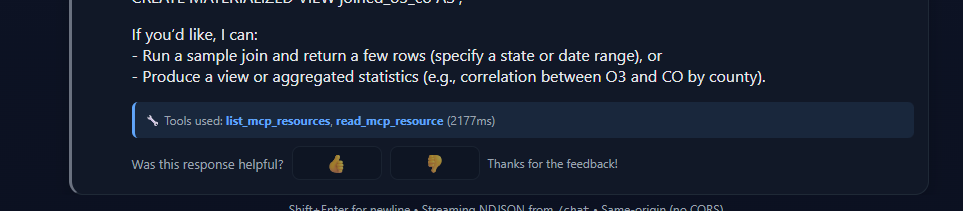
Now, when the user presses either the “up” or down, the client should package the payload which has the trace id and send that to the server.
1
2
3
4
5
6
7
8
9
10
11
12
13
14
15
16
17
18
async function sendFeedback(rating, reason, meta, statusEl) {
      const payload = buildFeedbackPayload(rating, reason, meta.requestId, meta.clientId);
      statusEl.textContent = "";
      try {
        const res = await fetch("/feedback", {
          method: "POST",
          headers: { "Content-Type": "application/json" },
          body: JSON.stringify(payload)
        });
        if (res.ok) {
          statusEl.textContent = "Thanks for the feedback!";
        } else {
          statusEl.textContent = "Error sending feedback.";
        }
      } catch {
        statusEl.textContent = "Error sending feedback.";
      }
    }
Next on the server side, you take that id and get the trace in MLFlow and attach the feedback to it.
1
2
3
4
5
6
7
8
9
10
11
      # Since we're using OTel trace_id we can use it directly
      pb = FeedbackPayload(**data)
      mlflow.log_feedback(
          trace_id=trace_id,
          name="satisfaction_score",
          value=pb.rating if pb.rating is not None else 0.0,
          rationale=pb.reason,
          source=AssessmentSource(
              source_type=AssessmentSourceType.HUMAN, source_id=user_id
          ),
      )
The end result is that in MLFlow UI, you will see the feedback linked to the correct trace. This is an example of a binary feedback, you can further customize this for multi-level ratings (1-5 stars) or categorical feedback.

Note that if your app does support retrieving past conversations/threads then the unique identifier should be stored as part of that as well so that you give the option for an user to generate feedback later.
If you cannot use trace id as the key, an alternative pattern can be storing a key-value of your request to trace in a fast memory store like Redis.
Automated Feedback
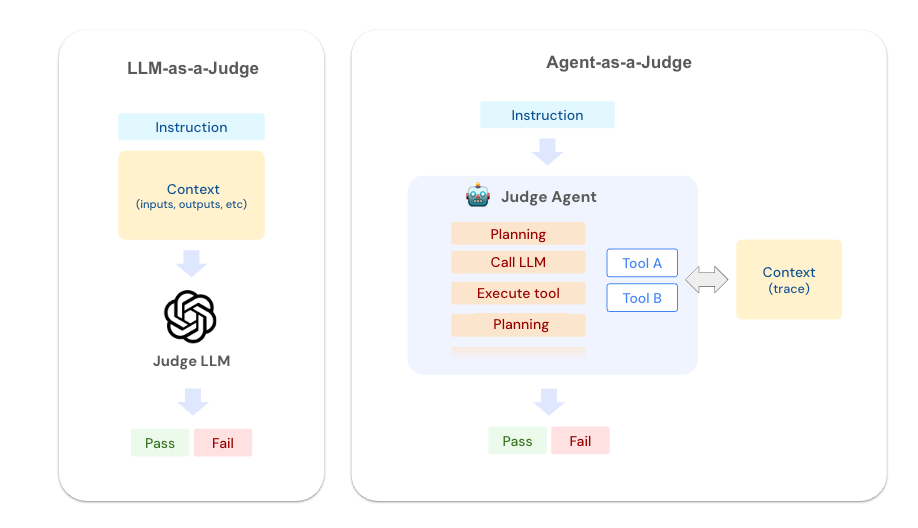
While human feedback is great and a great way for users to provide feedback, it should not be the only way for feedback. You should run automated scan on a batch basis targeting different metrics you want and can attach to the same trace or a new experiment depending on your use case. The LLM-as-a-judge pattern can be extremely effective in doing these kind of analysis at scale. In MLFlow, its called agent as a judge which enhances the LLM pattern to intelligently select the traces as needed to answer the analysis question. As a first step, you define your scorers
1
2
3
4
5
6
7
8
9
10
11
12
13
14
15
16
17
18
19
20
21
22
23
24
25
26
27
28
29
# Judge for factual accuracy and hallucination detection
accuracy_judge = make_judge(
    name="accuracy_checker",
    instructions=(
        "Evaluate the  for factual accuracy.\n\n"
        "Check for:\n"
        "- Hallucinations or made-up information\n"
        "- Contradictions with source documents (if RAG was used)\n"
        "- Unsupported claims presented as facts\n"
        "- Proper citation of sources when required\n\n"
        "Rate as: 'accurate', 'minor_issues', or 'hallucination_detected'"
    ),
    model=f"azure:/{AZURE_OPENAI_DEPLOYMENT_NAME}",
)

# Judge for response quality and helpfulness
quality_judge = make_judge(
    name="quality_analyzer",
    instructions=(
        "Analyze the  for response quality.\n\n"
        "Check for:\n"
        "- Direct answer to the user's question\n"
        "- Appropriate level of detail (not too brief or verbose)\n"
        "- Clear and well-structured response\n"
        "- Follows instruction constraints (length, format, tone)\n\n"
        "Rate as: 'excellent', 'good', 'poor', or 'off_topic'"
    ),
    model=f"azure:/{AZURE_OPENAI_DEPLOYMENT_NAME}",
)
Then you run those for the traces you want
1
2
3
4
5
6
7
8
9
10
11
12
13
  base = f"timestamp >= {since}"
  traces = mlflow.search_traces(experiment_ids=[experiment_id], return_type="list",filter_string=base)
  for trace in traces:
      feedback = accuracy_judge(trace=trace)
      mlflow.log_feedback(
              trace_id=trace.info.trace_id,
              name="llm_accuracy_analysis",
              value=feedback.value,
              rationale=feedback.rationale,
              source=AssessmentSource(
                  source_type=AssessmentSourceType.LLM_JUDGE, source_id=os.getenv("AZURE_OPENAI_DEPLOYMENT_NAME", "gpt-4")
              ),
      )
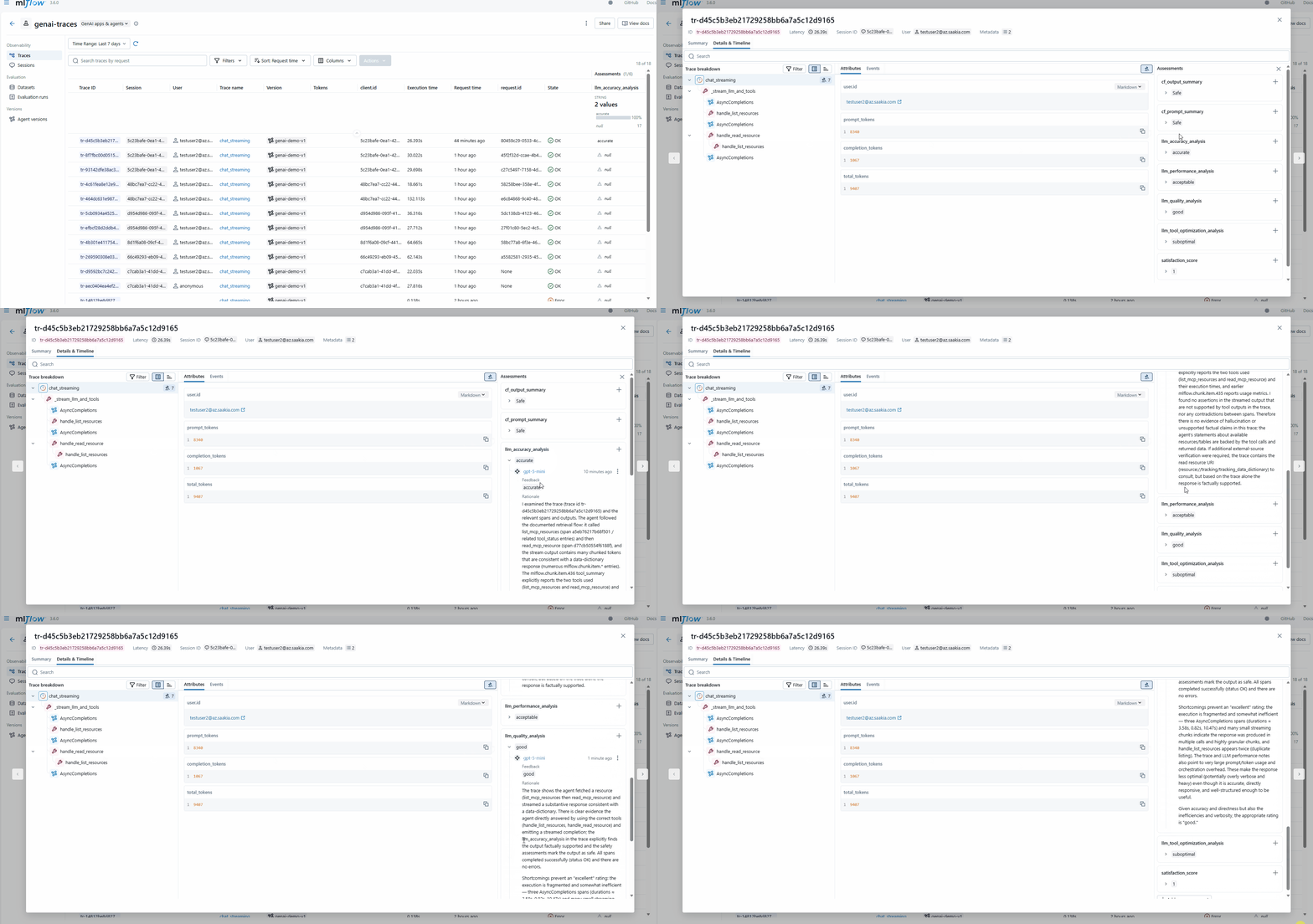
and you can get a rich feedback on your traces. Pretty cool! Do note that, these take some time to run and has a cost (you are calling LLMs) so while you may be aggresive on these when you are initially rolling out, you may want to do a random percentage as your product stabilizes if cost starts to become a concern.
Summary
Feedback is the critical bridge between your AI application’s output and real-world performance. By implementing both human and automated feedback mechanisms, you create a comprehensive quality assurance system that scales with your application.
Human feedback provides authentic user sentiment but is sparse and reactive. It tells you what real users care about but only captures a small percentage of interactions.
Automated feedback using LLM-as-a-judge patterns provides continuous monitoring and catches issues before users do, but requires careful tuning and has ongoing costs.
Together, these feedback loops give you what you need to actually improve your AI system:
- Catch hallucinations and factual errors before they become problems
- Spot quality trends as they develop
- Build real evaluation datasets from production data
- Make informed decisions on prompts and RAG tuning
The key is tying everything back to your traces in MLflow (or whatever observability tool you use). When feedback, model behavior, and user satisfaction live in the same place, you can actually see what’s working and what’s not. That’s what makes continuous improvement possible.