Agentic AI - Security : Authorization
Intro
You’ve built an agentic AI app. It may query your database, pull reports and so on - bottom line…it works. But take a step back and reflect, your agent has its own credentials. It’s connecting to systems with its own permissions. And the intersection of your user’s permissions and the agent’s permissions isn’t straightforward—especially when some of those systems are a decade-old SQL Server or other legacy systems. It’s the gap between “demo looks great” and “our agent is actually safe to deploy.” And it gets complicated fast.
The current consensus for the MCP protocol and agentic frameworks is OAuth 2.1 with OpenID Connect (OIDC). OIDC handles authentication—verifying who the user is and providing their identity in a token. OAuth 2.1 handles authorization—defining what that authenticated user can access.
The authentication piece is relatively straightforward: user logs in, receives a token with their identity and claims. The authorization piece is where things get complex…your agent receives a token representing the user’s identity and scopes. The agent can only perform actions that both the user AND the agent are permitted to do—the intersection of those two permission sets becomes the effective access boundary. The flow looks like this:
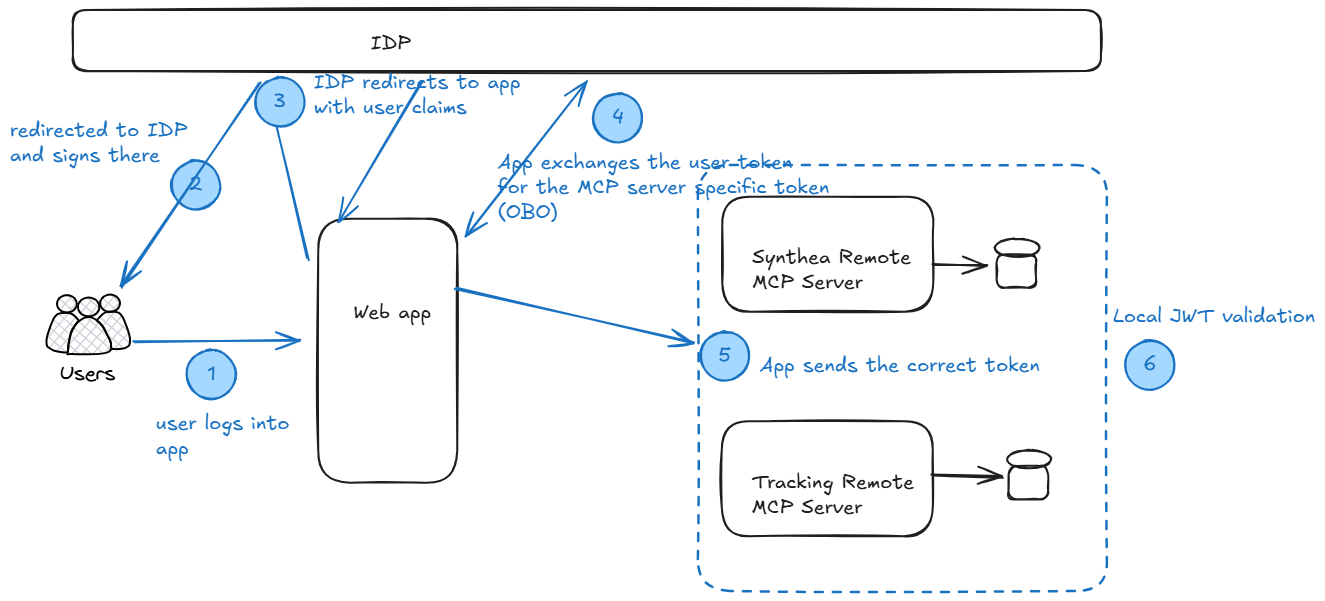
Unfortunately, this is simple in theory but complex in practice. Not all data is equal from a security perspective, and OAuth manifests very differently depending on whether you’re working with unstructured content or structured databases. At a high level, the OAuth flow for my demo app would be this
Unstructured Data :
OAuth shines here. These are PDFs, images, chat messages—content where access is binary. You have permission to the document or you don’t. For a bit more complex use-cases (think sharepoint folders), some folks have admin roles while others have read-only roles … but rarely partial access.
From an OAuth perspective, this is straightforward: create a group identity for your users, use the group’s app ID as your agent’s persona, request read scopes, and you’re done. The downstream system (SharePoint, Google Drive, etc.) handles authorization natively.
In an AI world, this is where LLMs are very capable and most demos end up showing this. Replace the downstream system with vector databases and keep the above security model and you have your secure RAG. Simple and effective.
Structured Data :
This is where OAuth gets messy. Databases have been in place for decades and support varying degree of roles. For example in relational databases, its common to have permissions for read, varied permissions on execution of stored procedures, row level security (which rows an user can see), columns masking (protecting specific fields).
The key question: at what permission level should your agent operate? Your OAuth token might authenticate the user, but how does that map to the database’s permission model if it does not support OAuth? Does the agent connect as the user? As a service account? What happens when your user’s OAuth scopes don’t align with database grants?
This needs to be thought out before implementing your agent app. Clarify, understand and ensure that your requirements and expected outcomes are clear and established. That allows the MCP server (in my example) to then take the persona of the required audience (example regular read-onl data analyst) and that persona is mapped to the required database grants. This sounds like a common thing to do, but its possible that when designing an agent that handles multiple personas - folks often take the easy way out. If your agent/MCP server needs to handle multiple personas, then there are a couple of options.
- Dynamic credential selection based on user role - Depending on the user’s role, dynamically select a credential for accessing the backend database. This means having a map of roles to basic credentials that you can lookup according to the user role/group/claim and use that credential for connecting to the backend data store.
Important: Store these credentials in a secure vault rather than configuration files. Each service account should follow the principle of least privilege—a read-only analyst role should map to a database account with only SELECT permissions.
- Authorization at the tool level - Design your MCP tools so that you can implement authorization at the tool level. In theory, you can implement authorization at the MCP server root but, in my opinion, its more likely that some tools and resources have more flexible permissions while others are more restricted.
For cloud-native databases like Azure SQL Database (via Entra ID), you can pass the user’s OAuth token directly and let the database handle authorization. For on-premise SQL Server, Oracle, or other legacy systems without OAuth support, you’ll need to implement authorization at the MCP server layer using one of the approaches above.
As an example of authorization at tool level, consider the example below. In the MCP server code, before the SQL execution tool runs, it checks whether the authenticated user has the ‘execute_sql’ permission. User Test User 1 has this permission, hence the response will be this…
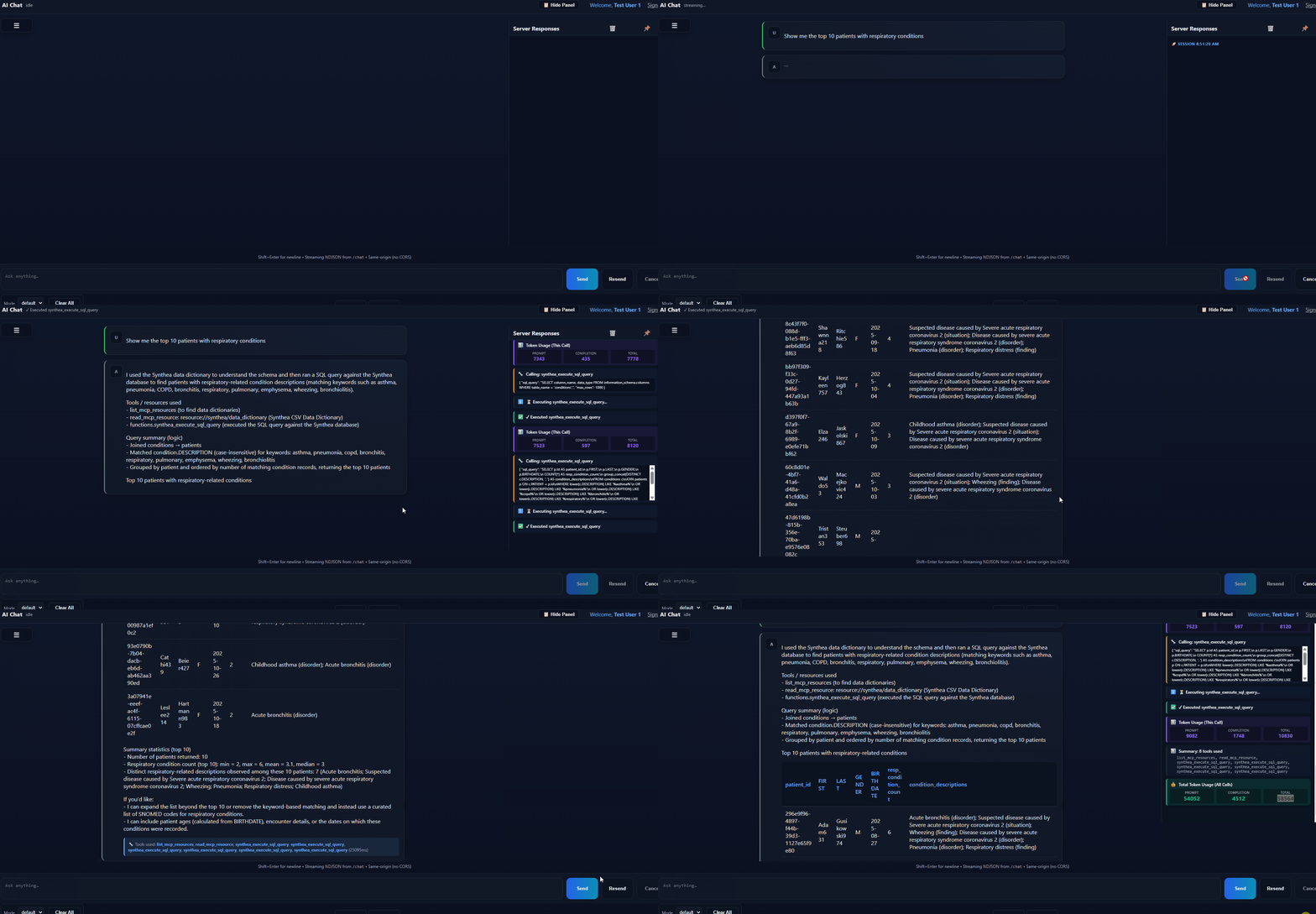
Note, the above code and chain of tool calls is not optimized and intent is to show a successful tool call not prompt oprimization.
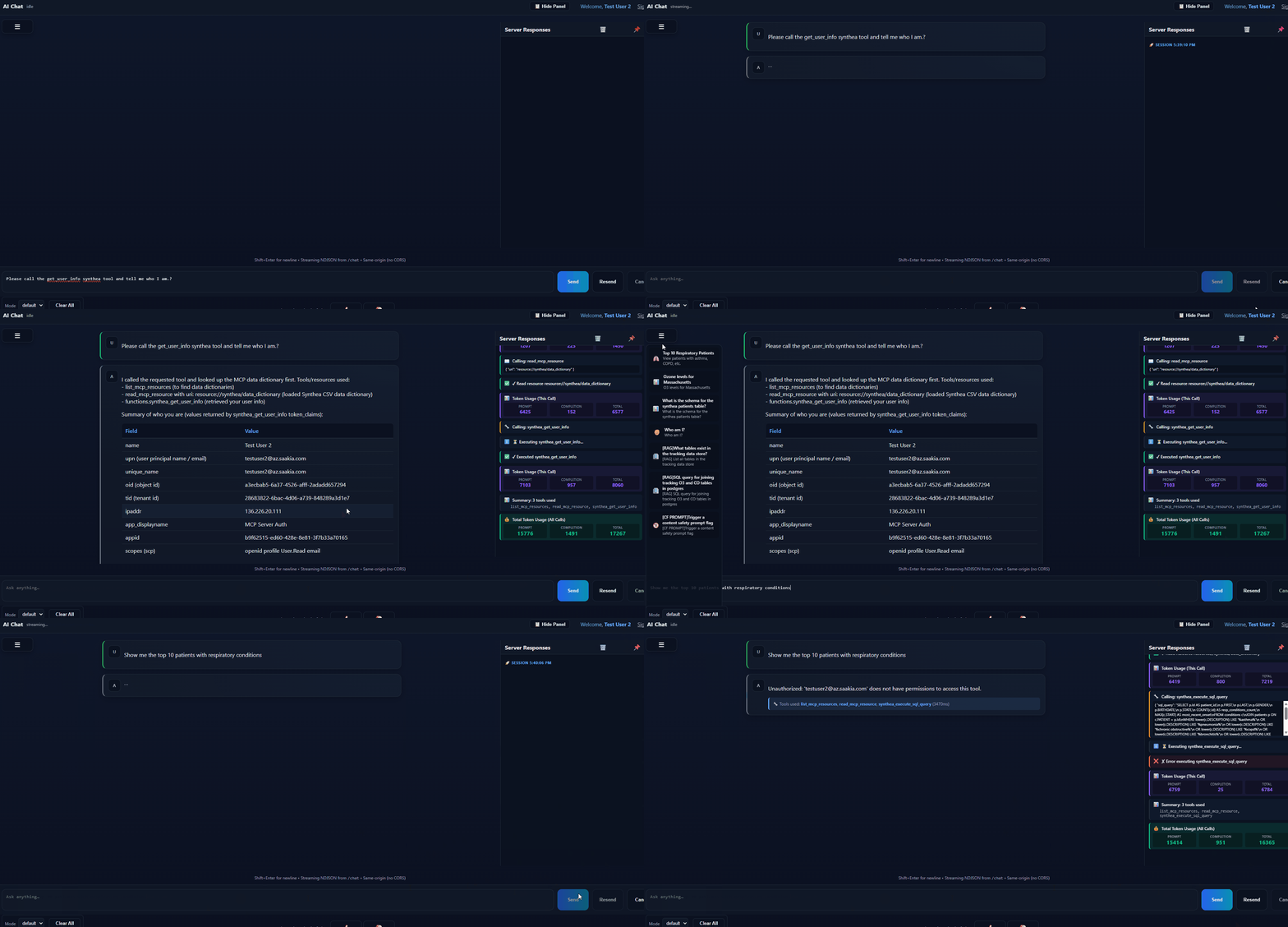
Now for the same call, but with a different user Test User 2, while this user can query for the data dictionaries etc, he/she are prohibited from calling the tool through authorization from the MCP tool.
Summary
Security for agentic AI isn’t the same as traditional application security. The core challenge: your agent operates with its own identity and permissions, which may not align with what individual users should access. This gap is manageable for unstructured data but gets complex fast with structured data.
The solution isn’t purely technical. You need to answer the business question first: what should this agent actually do, and for whom? Then design your security model around that specific use case. Don’t build a general-purpose agent with privileged access and hope authorization happens somewhere downstream. By the time you realize the permissions are wrong, you’re looking at an expensive redesign.
Start narrow. Expand deliberately.