Azure Model Router
Intro
When you are building Gen AI applications where the users are not interacting with the model (backend agentic AI applications or triggering a LLM through api), then you are more or less starting out with a single backend LLM that is the best fit for your call and as your code stabilizes, you upgrade the LLM depending on your evaluation criterias. Standard stuff.
But, what happens if your application is not a backend application but rather an user-facing application where the user input (prompt) can be simple or complex. What model do you select then? Select the smaller LLMs and the complex questions may suffer, select the larger LLMs and you pay more for even the simplest questions. In such cases, as a best practices, implementing a model-router pattern is an alternative pattern worth considering.
The model-router pattern is a decision layer that selects the most appropriate model for each request at inference time, balancing capability, cost, latency, and risk based on prompt complexity, constraints, and context.
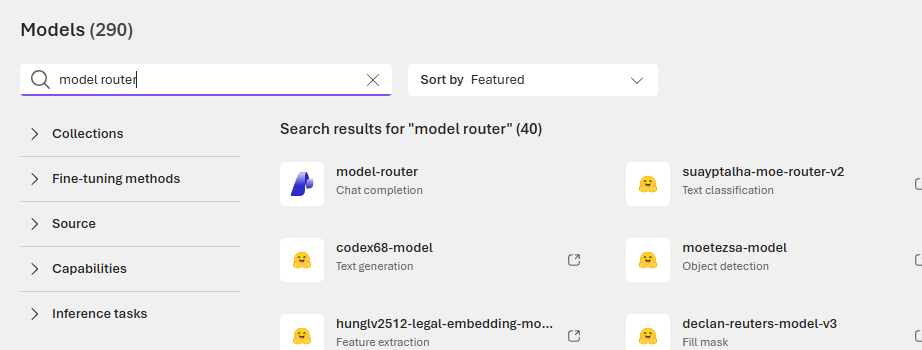
Deploying the model-router in Azure Foundry is identical to deploying other Foundational Models. You select the model and deploy it.
The difference is that you can configure the Routing Mode
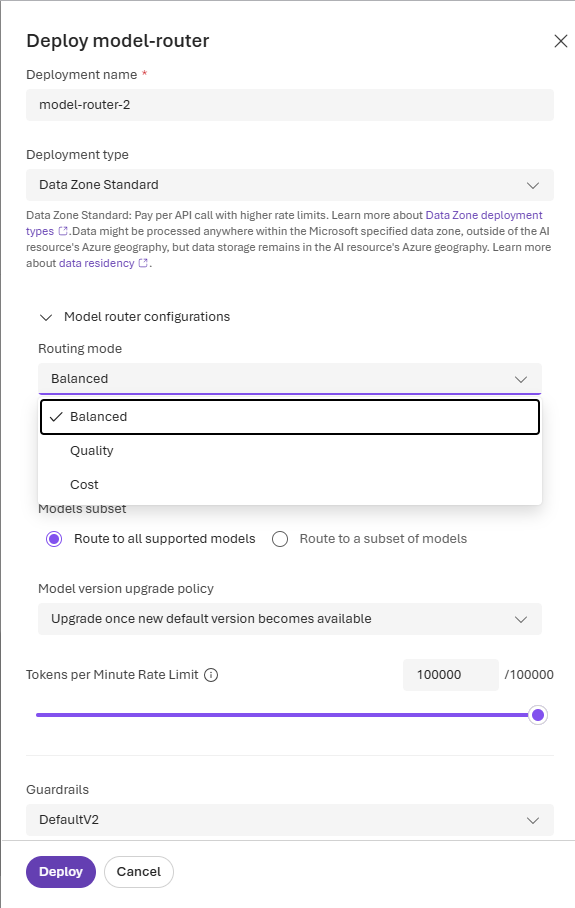
A quick summary of these options are below
| Routing Mode | Quality Range Considered | Selection Behavior |
|---|---|---|
| Balanced (Default) | Small range (e.g., 1–2% below the highest-quality model for the prompt) | Selects the most cost-effective model within this quality range |
| Cost | Larger range (e.g., 5–6% below the highest-quality model for the prompt) | Selects the most cost-effective model within this wider quality range |
| Quality | Highest quality only | Selects the highest-quality rated model for the prompt, ignoring cost |
You can get more detailed insights from the azure docs page
Implementation
For testing the model router, i went ahead and deployed it to Azure Foundry using the Balanced (Default) behaviour. I am on a sponsered Azure Subscription, so i do not have access to the latest frontier models (GPT 5.2, Claude etc) so i am making do what i have :).
Next, i needed to get some varied prompts to see this action so i selected Google’s Instruction Following Eval (IFEval) benchmark prompts found in hugging face. Instead of running all the 500 prompts, for my scenario, i am capping it to the top 200. I then call the LLM for each of these prompts and capture the relevant information for later analysis.
1
2
3
4
5
6
7
8
9
10
11
12
13
14
15
16
17
18
19
20
21
22
23
24
25
26
27
28
29
30
31
# Cell 5 — Run the full dataset (optionally sample for quick runs)
# For quick smoke test, set N like 25 or 50. For full run, set N=None.
N = 200  # e.g. 50

run_prompts = prompts if N is None else prompts[:N]

run_id = datetime.now(timezone.utc).strftime("%Y%m%dT%H%M%SZ")
results = []

for i, p in enumerate(tqdm(run_prompts, desc="Running IFEval prompts")):
    r = call_azure_chat(p, deployment=AZURE_OPENAI_DEPLOYMENT, temperature=0.0)

    results.append({
        "run_id": run_id,
        "idx": i,
        "prompt": p,
        "prompt_len_chars": len(p),
        "model": r["model"],
        "latency_s": r["latency_s"],
        "prompt_tokens": r["prompt_tokens"],
        "completion_tokens": r["completion_tokens"],
        "total_tokens": r["total_tokens"],
        "error": r["error"],
        # Comment out next line if you don't want to store responses
        "response_text": r["text"],
    })

df = pd.DataFrame(results)
df.head()
Once all 200 prompts finished processing, i then plotted to see what the routed models were which is show below.
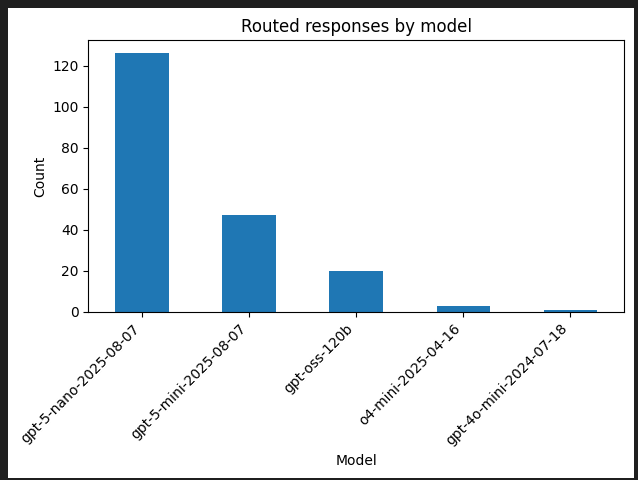
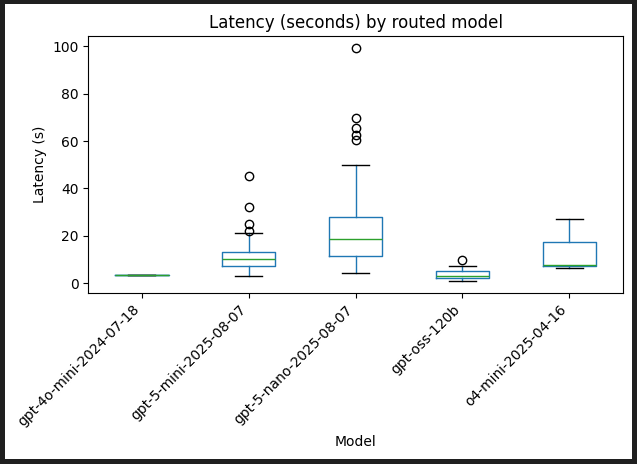
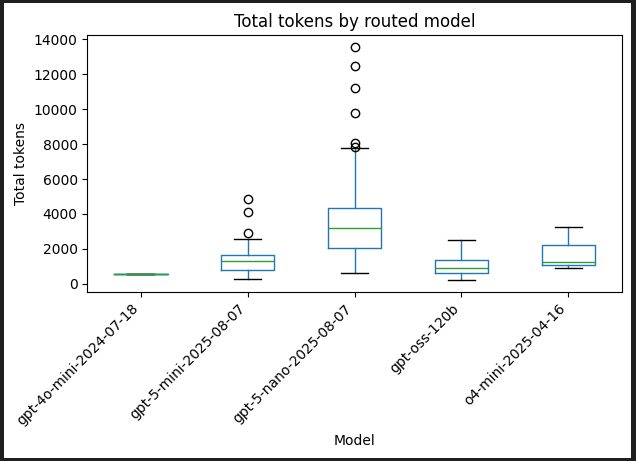
The results from running 200 IFEval prompts through the model router show intelligent routing in action. The router used gpt-5-nano-2025-08-07 as its workhorse, handling 63% of requests (~126 out of 200) — primarily straightforward creative tasks like writing cover letters, blog posts, and lists. The slower latency (21.85s mean) and higher token usage (3,546 mean tokens) reflect both the volume and the long-form nature of these outputs. Meanwhile, the router reserved its premium models — gpt-oss-120b (3.77s, 20 requests), o4-mini (3 requests), and gpt-4o-mini (1 request) — for the ~12% of prompts with complex meta-instructions like “repeat the request first, then answer” or nested conditional logic. This demonstrates the model router’s value proposition: use capable-but-efficient models for standard work, and only invoke the expensive firepower when prompt complexity truly demands it.
So what kind of prompts did it route to the larger models? Here are some samples
Write an email to my boss telling him that I am quitting. The email must contain a title wrapped in double angular brackets, i.e.
<<title>>. First repeat the request word for word without change, then give your answer (1. do not say any words or characters before repeating the request; 2. the request you need to repeat does not include this sentence)Write an email to my boss telling him that I am quitting. The email must contain a title wrapped in double angular brackets, i.e.
<<title>>. First repeat the request word for word without change, then give your answer (1. do not say any words or characters before repeating the request; 2. the request you need to repeat does not include this sentence)Write an interesting and funny article about the biology of a banana peel. In your response, the word disappointed should appear at least 2 times, and at least six section should be highlighted with markdown, i.e banana peel.
Here are some of the prompts it routed to gpt-5-nano-2025-08-07
- List the pros and cons of using two different names for the same thing. Make sure the word synonyms appears at least 3 time.
- Write a cover letter for a job at a local coffee shop in the form of a poem. Highlight at least 5 text sections using “”. For example: *3 years of experience.
- Create a blog post for professionals in the field of computer science in the form of a funny riddle. Your entire reply should contain 600 to 700 words.
Quality Mode
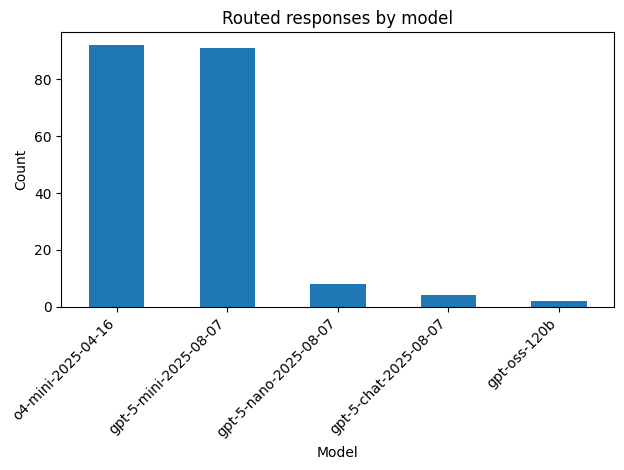
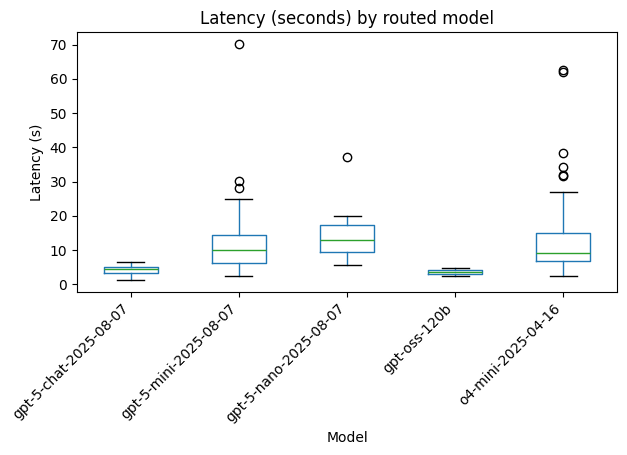
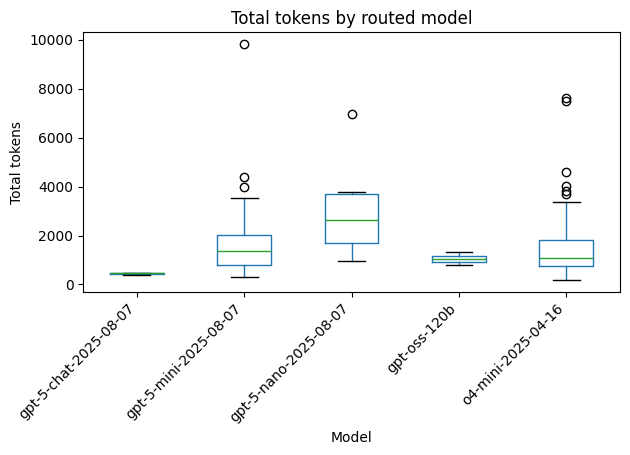
I went ahead and then update the router’s mode to be Quality and reran the same tests. Switching to Quality mode reveals a dramatically different routing strategy. The router now splits work almost evenly between two premium models: o4-mini-2025-04-16 and gpt-5-mini-2025-08-07 each handled ~92 requests (46% each), accounting for 92% of all traffic. The remaining 8% trickled to gpt-5-nano (8 requests), gpt-5-chat (4 requests), and gpt-oss-120b (2 requests). Latency and token patterns show these two workhorses operating in similar ranges — o4-mini averaging 8-15s and gpt-5-mini at 10-15s, with comparable token usage around 1,000-2,000 tokens. Unlike Balanced mode’s cost-conscious single workhorse approach, Quality mode demonstrates the router’s willingness to leverage multiple high-capability models without concern for efficiency.
Summary
While a model router pattern may not apply to every use case, it does have benefits for probably the majority of them. The ability to select which models the router should route to — either custom or based on modes such as cost, quality, or balanced — without needing to write a single line of code is immense. And these modes aren’t just marketing labels — they produce dramatically different routing behaviors. In Balanced mode, the router consolidated 63% of requests to a single model (gpt-5-nano), reserving other models for the ~37% of truly complex prompts. Switch to Quality mode, and the strategy flips entirely: 92% of traffic now splits between two models (o4-mini and gpt-5-mini) with minimal concern for efficiency. This allows you to quickly test different optimization strategies, see real performance and cost trade-offs, and take the guesswork out of which model to select across the inevitably large range of prompts that your application will need to handle.
When do you not want to use the router pattern? Here are some scenarios where this pattern may not apply, but as always…it depends on your use case.
- Highly specialized domains where one model excels
- Sub-second latency requirements (routing adds overhead)
- Debugging/reproducibility needs (routing introduces variability)